Kitchen inventory app guide / Comparison
ScanMyPantry vs ShelfCentered
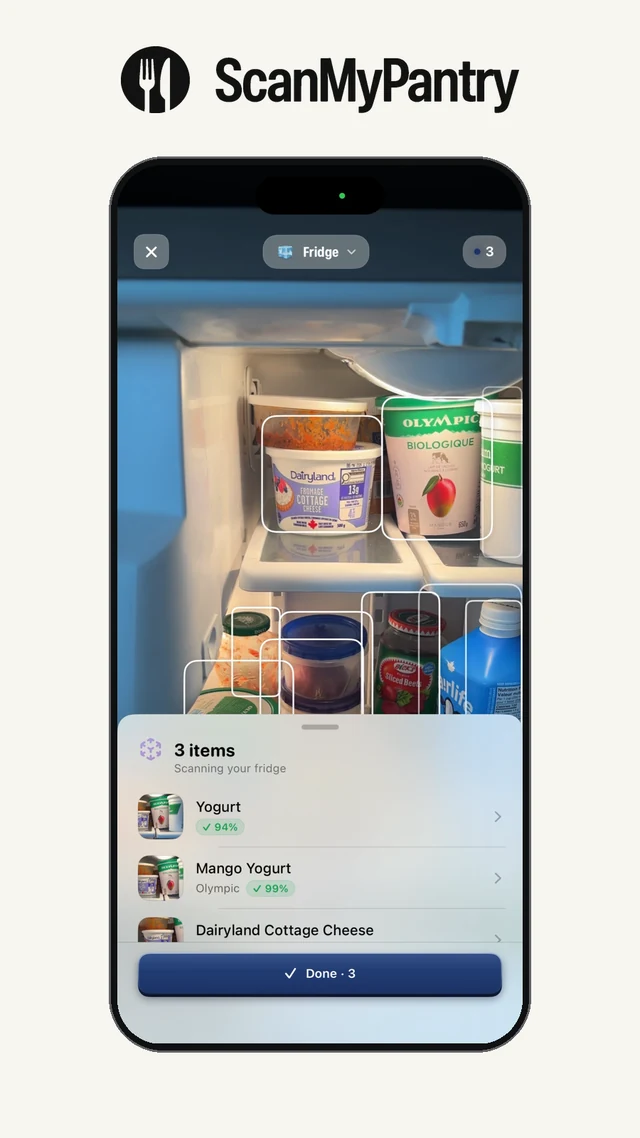
Quick answer: Both apps can suggest meals from a saved kitchen inventory. ScanMyPantry shows live AR outlines as you move the iPhone camera. ShelfCentered starts with a photo of your fridge, pantry, or freezer and shows a list for review.
This page is published by the developer of ScanMyPantry. It compares features stated in each product's public App Store listing or official product page; it is not a hands-on test of every feature. Store availability and plans can vary by region and change over time.
Feature comparison
| Feature | ScanMyPantry | ShelfCentered |
|---|---|---|
| How scanning starts | Move the live camera over visible groceries. Check the AR outlines and suggested names before saving, with no separate barcode scan. | Photograph the storage area, then review the detected items before adding them. The listing also describes receipt and barcode entry. |
| Finding dinner ideas | Use reviewed groceries to find recipes and check estimated nutrition per serving. | Get meal suggestions from recorded groceries, or import a recipe and check which ingredients you already have. |
| Shopping list | Create shareable text for ingredients the app could not match to the saved inventory. | The listing describes building a grocery list from missing ingredients and sorting it by store section. |
When ScanMyPantry may fit
Try ScanMyPantry if you want to see which items the camera recognizes while you move across a shelf.
If two items overlap, change the angle and use the live outlines to see which one is visible. Then review the names and amounts.
When ShelfCentered may fit
Consider ShelfCentered if you prefer to take a photo first and want to import recipe links into the same app.
ShelfCentered’s listing describes importing recipes from websites and social videos and checking what you already have against the ingredient list.
Try both apps with the same shelf and recipe
Place a loose pepper, a yogurt cup, and a partially hidden carton on one shelf. Start from the same angle. Move the camera across the shelf in ScanMyPantry and take a photo in ShelfCentered. Check what each app picked up and which names and amounts you had to correct before saving.
Pick a recipe for the same number of people in each app. Check whether the saved groceries carry over and compare what the recipes still require. Watch ScanMyPantry’s live scan with timestamps or compare more recipe entry methods.
For each app, record how many of the three groceries were suggested correctly on the first pass, how many you corrected or entered by hand, and which saved ingredients appeared in the recipe. Keep the partially hidden carton in the same spot for the first pass. Then bring it into view and record whether another pass helps.
If you’re also considering FridgeSmart, use the same test to compare its single-photo workflow.
Sources and review method
Feature descriptions were checked against the linked public sources on November 20, 2026. Check each current listing for availability, device requirements, and price in your region.
Read the kitchen inventory guide, review the app-selection checklist, or see ScanMyPantry's privacy policy.