Kitchen inventory app guide / Comparison
ScanMyPantry vs FridgeSmart
Quick answer: ScanMyPantry outlines visible groceries as you move the live iPhone camera and lets you review suggestions before saving. FridgeSmart’s App Store listing describes taking one fridge photo to identify foods, estimate quantities, and suggest freshness dates.
This page is published by the developer of ScanMyPantry. It compares features stated in each product's public App Store listing or official product page; it is not a hands-on test of every feature. Store availability and plans can vary by region and change over time.
Run the same-shelf test or watch ScanMyPantry’s live iPhone scan.
Feature comparison
| Feature | ScanMyPantry | FridgeSmart |
|---|---|---|
| First input | Move the live camera across a shelf and watch the AR boxes appear. | Take a fridge photo. The listing also describes individual photo and barcode entry. |
| Loose food | Point the camera at visible produce without a barcode and confirm the suggestions. | The listing describes identification from a fridge photo. Check how it handles loose or partly hidden items on your shelf. |
| Dates and quantities | Review the names and amounts and record dates you want to track. | The listing describes estimated quantities and suggested freshness dates. Check both against your groceries. |
| Recipes | Find recipe ideas using saved kitchen inventory. | The listing describes recipe ingredient matching and a count of ingredients you have. |
When ScanMyPantry may fit
Try ScanMyPantry if you want to move the camera around overlapping groceries and see which ones get outlines while scanning.
Try a loose pepper beside a partly hidden carton. Start from the same angle in both apps, then bring the carton into view for a second pass. Record which suggestions you corrected before saving.
When FridgeSmart may fit
Consider FridgeSmart if you prefer taking one photo first and want suggested freshness dates.
A single fridge photo gives you one frame to review. Check which groceries are visible in that frame before taking it.
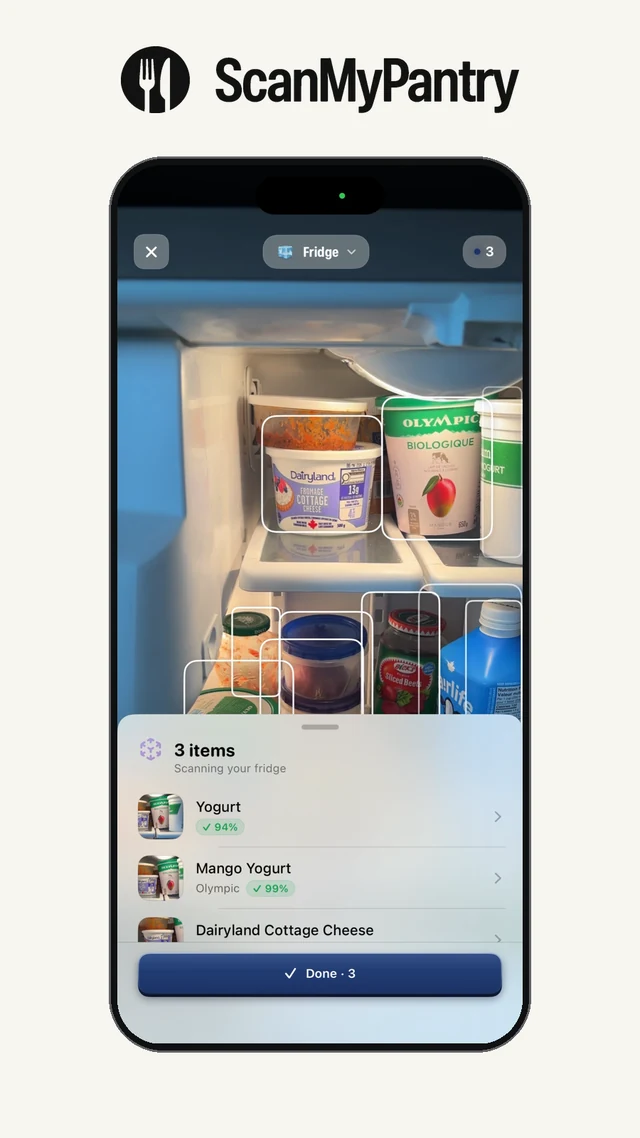
Compare a live scan and a single photo on the same shelf
- Place a loose pepper, a labeled yogurt cup, and a carton partly behind the yogurt. Record the actual quantities before opening either app.
- Start from the same position. Take one fridge photo in FridgeSmart and scan the shelf with the live camera in ScanMyPantry. Record which items each app suggests and which names or amounts need correction.
- Bring the carton into view and try again. Save the corrected entries, then reopen each fridge list to check what was recorded.
Download the scanner comparison worksheet to record the results. Watch ScanMyPantry’s live iPhone scan before trying your own shelf.
Sources and review method
Feature descriptions were checked against the linked public sources on November 20, 2026. Check each current listing for availability, device requirements, and price in your region.
Read the kitchen inventory guide, review the app-selection checklist, or see ScanMyPantry's privacy policy.