Kitchen inventory app guide / Comparison
ScanMyPantry vs The Pantry
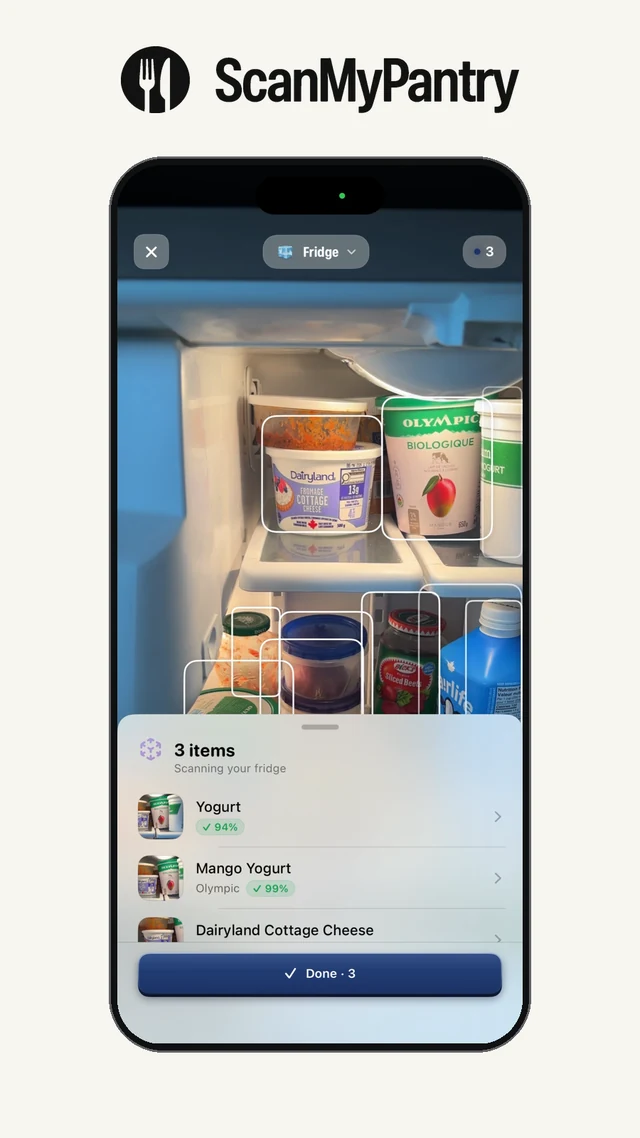
Quick answer: ScanMyPantry starts with what the live iPhone camera sees on your shelves. The Pantry lists typed, voice, barcode, and receipt entry, plus recipe imports and a weekly meal calendar.
This page is published by the developer of ScanMyPantry. It compares features stated in each product's public App Store listing or official product page; it is not a hands-on test of every feature. Store availability and plans can vary by region and change over time.
Feature comparison
| Feature | ScanMyPantry | The Pantry |
|---|---|---|
| Adding food | Live AR camera suggestions with review before saving | Typed, voice, barcode, or receipt entry in the Google Play listing |
| Finding dinner | Recipe suggestions from saved groceries and cooking preferences | Matches recipes to saved groceries and supports recipe imports |
| Before shopping | Check what each recipe still needs and share a list | Build a grocery list from missing ingredients in planned meals |
When ScanMyPantry may fit
Consider ScanMyPantry if your first task is recording groceries already on a shelf without looking up barcodes.
Live AR outlines show what the camera sees, including visible loose produce. Review suggestions before saving groceries.
When The Pantry may fit
Consider The Pantry if you often cook from recipes you collect and want those recipes matched to inventory and added to a weekly calendar.
Import recipes from links or cookbook photos, match them to recorded ingredients, and put meals on a calendar.
Try planning the same dinner two ways
Start with a loose pepper and a can of chickpeas. In ScanMyPantry, scan the groceries with live AR, check the names and quantities, and save them. Ask for a low-cost dinner for two, then check which ingredients the recipe still needs.
In The Pantry, add the same groceries using a method available in the app. Import a chickpea dinner you already like, match it to your inventory, and check the missing ingredients before adding the meal to your calendar. Use the same serving count in both apps and compare what you’d buy.
See how to compare the cost of two shopping lists.
Sources and review method
Feature descriptions were checked against the linked public sources on November 19, 2026. Check each current listing for availability, device requirements, and price in your region.
Read the kitchen inventory guide, review the app-selection checklist, or see ScanMyPantry's privacy policy.
