Kitchen inventory app guide / Comparison
ScanMyPantry vs FridgeTrack
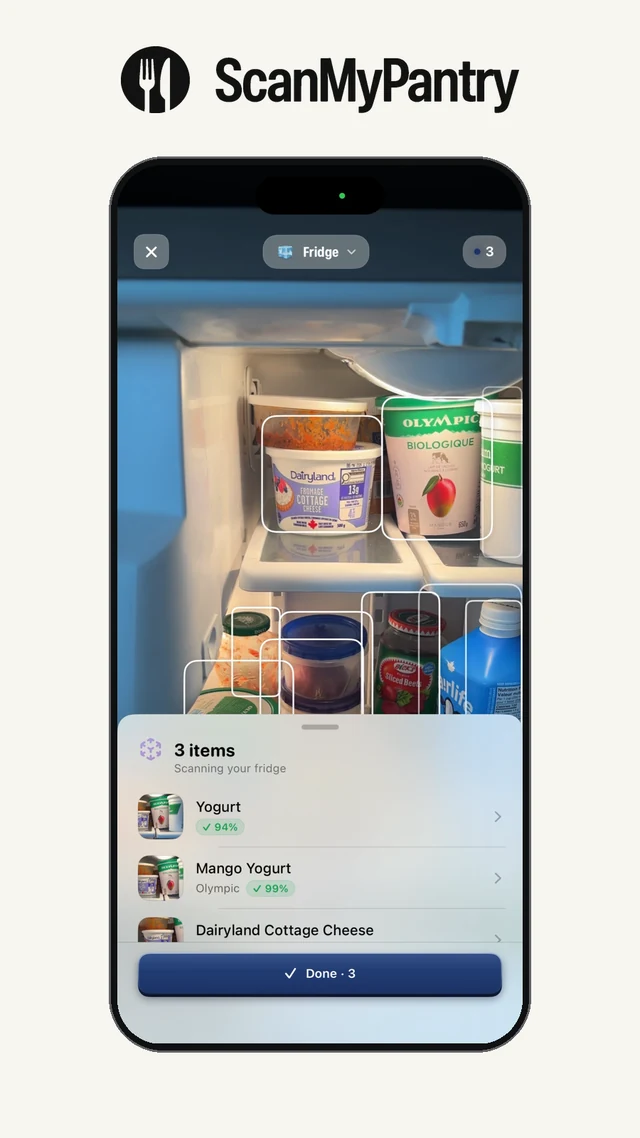
Quick answer: Both apps organize groceries by storage area and track expiration dates. ScanMyPantry shows live AR outlines around visible groceries as you move the iPhone camera. FridgeTrack lists barcode lookup, receipt scanning, and food recognition from a photo as Pro features.
This page is published by the developer of ScanMyPantry. It compares features stated in each product's public App Store listing or official product page; it is not a hands-on test of every feature. Store availability and plans can vary by region and change over time.
Feature comparison
| Feature | ScanMyPantry | FridgeTrack |
|---|---|---|
| Fridge, pantry, and freezer | Save reviewed entries to their storage location | Lists all three locations in its App Store description |
| Camera workflow | Live AR outlines and suggestions for visible food | Pro food recognition from a photo, barcode lookup, and receipt scanning |
| Expiration dates | Record dates and use reminders | Lists expiration dates and reminders among Pro features |
When ScanMyPantry may fit
Choose ScanMyPantry if you mainly want to record loose produce and other visible groceries already on your shelves.
See boxes and suggestions as you sweep the camera over visible groceries, then review what to save. No barcode is required.
When FridgeTrack may fit
Consider FridgeTrack if you prefer to start with receipts or barcode lookup and want date reminders.
Add purchases from a receipt or use a barcode or food photo, according to the App Store listing.
Try a receipt and a fridge shelf from the same shop
Keep a receipt with a loose pepper and a packaged grocery. If you have FridgeTrack Pro, try importing the receipt. Check whether the abbreviated lines match what you bought. Later in the week, when one item is used up, compare the imported list with what remains.
Point ScanMyPantry’s live iPhone camera at what’s still on the shelf. Check which foods get AR boxes, correct any suggestions, and save the groceries you want to track. Try FridgeTrack’s photo entry on that same shelf to compare the suggestions each app gives you. Count which entries need correcting in each workflow.
See how to choose an entry method for your fridge or record the results in the scanner review worksheet (CSV).
Sources and review method
Feature descriptions were checked against the linked public sources on November 19, 2026. Check each current listing for availability, device requirements, and price in your region.
Read the kitchen inventory guide, review the app-selection checklist, or see ScanMyPantry's privacy policy.
