Kitchen inventory app guide / Comparison
ScanMyPantry vs FridgeBuddy
Quick answer: ScanMyPantry shows live grocery outlines while you move the iPhone camera. FridgeBuddy adds groceries from barcodes, receipts, and shelf photos on supported devices. Both help organize food by storage location.
This page is published by the developer of ScanMyPantry. It compares features stated in each product's public App Store listing or official product page; it is not a hands-on test of every feature. Store availability and plans can vary by region and change over time.
Feature comparison
| Feature | ScanMyPantry | FridgeBuddy |
|---|---|---|
| What the camera shows | Live AR outlines appear as you move the camera over visible food. Check the suggestions before saving to inventory. | Scan a barcode or submit a photo of a shelf. The listing specifies iOS 27 and a device with Apple Intelligence for shelf-photo entry. |
| Dates and reminders | Record dates you want to track for saved fridge, pantry, and freezer groceries. | Set reminder timing by location. Pro can read printed expiration dates with the camera. |
| Dinner and shopping | Find recipe ideas from saved ingredients, review estimated nutrition, and check what you still need to buy. | Share an inventory and shopping list through iCloud. Meal ideas are listed for devices with Apple Intelligence. |
When ScanMyPantry may fit
Choose ScanMyPantry for a live scan of visible fridge items, including loose produce, before deciding what to cook.
The live outlines show what the camera is picking up. Move overlapping items into view and review names and amounts before saving.
When FridgeBuddy may fit
Consider FridgeBuddy for a barcode and receipt routine with configurable reminders by storage location.
The listing also describes shelf photos on supported devices and printed expiration date reading with Pro.
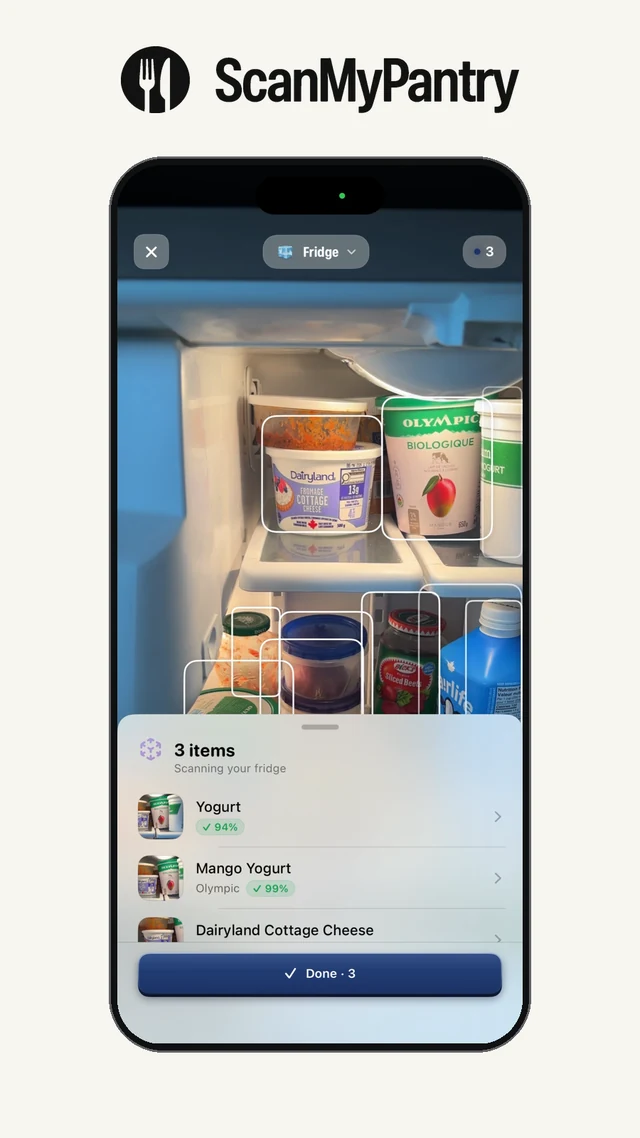
Test both apps on one fridge shelf
- Put a loose pepper, a yogurt cup with a readable barcode, and an opaque leftover container on the same shelf.
- In ScanMyPantry, move the live camera across the shelf and note what gets an AR outline. Check suggested names and quantities before saving.
- In FridgeBuddy, try the yogurt barcode and the shelf photo if your device supports it. Review which foods each method suggests, then enter the contents of the opaque container yourself.
- In both apps, reopen the saved fridge list and check the names, quantities, and any dates you entered.
Watch the live scan and use the scanner worksheet to record corrections and missed foods.
Sources and review method
Feature descriptions were checked against the linked public sources on November 18, 2026. Check each current listing for availability, device requirements, and price in your region.
Read the kitchen inventory guide, review the app-selection checklist, or see ScanMyPantry's privacy policy.
